Shared Power Bank Station 4G Connectivity Guide: LTE Bands, SIM Cards, Wi-Fi and Global Network Compatibility
A stable internet connection is essential for operating a successful shared power bank rental business.Whether a rental station is installed in a restaurant, shopping mall, airport, hotel or entertainment venue, reliable connectivity allows the equipment to communicate with the rental management platform, process rental commands and report station status.
For operators planning to deploy shared power bank stations internationally, selecting the right communication module, SIM card and network configuration is an important part of preparing for a successful launch.
As a manufacturer of shared power bank rental stations, VOLINKS provides hardware solutions, communication module configuration, APN setup assistance and technical integration support for overseas projects.
This guide explains how shared power bank stations connect to the internet, which LTE bands and communication modules to consider, how to manage SIM cards, and how to reduce network-related operating problems.
1. Why Is 4G Connectivity Important for Shared Power Bank Stations?
A shared power bank rental station is more than a charging device. It is connected equipment that exchanges information with a rental management system.
When a customer scans a QR code to rent a power bank, the station must communicate with the backend platform to receive and execute the rental command.
A reliable network connection supports several important functions:
Remote power bank release: Receive commands from the rental platform and release an available power bank.
Rental and return notifications: Report rental events, returns and station status to the backend.
Real-time monitoring: Allow operators to check station connectivity and inventory information.
Remote troubleshooting: Help technical teams identify communication problems without immediately visiting the installation site.
Software integration: Support communication between station hardware and the operator's rental software.
Operational management: Help operators manage stations distributed across different locations.
If a station loses its internet connection, communication with the management platform may be interrupted. This can affect rental availability, status reporting and remote maintenance.
For businesses operating dozens or hundreds of stations, network reliability becomes especially important.
2. How Do Shared Power Bank Stations Connect to the Internet?
VOLINKS provides different connectivity options depending on the station model.
Non-Screen Shared Power Bank Stations
Compact rental stations without advertising screens use 4G SIM card connectivity.
These stations are commonly installed in restaurants, cafés, bars, hotels and other locations where operators need a compact, easy-to-deploy rental solution.
Their network requirements are relatively simple because they primarily exchange rental commands, return notifications and equipment status information.
Screen-Equipped Shared Power Bank Stations
VOLINKS shared power bank stations equipped with advertising screens can support both:
4G SIM card connectivity
Wi-Fi connectivity
Wi-Fi is especially useful for stations displaying advertising images and videos, as media downloads can require substantially more data than ordinary rental operations.
For screen-equipped stations, VOLINKS recommends using Wi-Fi as the primary connection while keeping an active 4G SIM card installed.
Automatic Wi-Fi and 4G Failover
Supported VOLINKS screen-equipped stations provide automatic Wi-Fi and 4G network failover.
When the Wi-Fi connection becomes unavailable, the station can automatically switch to the configured 4G mobile network.
This is particularly useful when a venue:
Changes its Wi-Fi password.
Replaces its wireless router.
Experiences an internet service interruption.
Temporarily loses Wi-Fi coverage.
Automatic network failover helps reduce prolonged disconnections, although the actual recovery time depends on network conditions and device configuration.
For operators managing stations across many independent venues, this feature can reduce service interruptions, customer complaints and maintenance costs.
3. Understanding LTE Bands and Global Network Compatibility
One of the most important considerations when exporting shared power bank stations is LTE frequency band compatibility.
Different countries and mobile network operators use different frequency bands.
A communication module that works in one country may not support all the required bands in another country.
For example, LTE bands commonly encountered in different markets include:
| Market | LTE Bands to Consider |
|---|---|
| United States | B2 / B4 / B5 / B12 / B13 / B66 and other operator-specific bands |
| Canada | B2 / B4 / B5 / B7 and additional operator-specific bands |
| Europe | B1 / B3 / B7 / B8 / B20 |
| Australia | B1 / B3 / B5 / B7 / B28 and other operator-specific bands |
| Latin America | B2 / B4 / B5 / B7, depending on the country and operator |
These are planning references rather than complete compatibility lists.
The final module selection must be based on the specific country, mobile network operator, required LTE bands and network registration requirements.
Frequency compatibility alone does not guarantee that a SIM card or device will be accepted by a particular mobile network.
VOLINKS recommends confirming the local network requirements before production and shipment.
4. Recommended 4G Communication Modules for Different Markets
VOLINKS can configure different communication modules according to the destination market and the station model.
Examples of module configurations used or considered for overseas projects include:
| Country / Region | Communication Module |
|---|---|
| United States | EC25-NA |
| Australia | EC25-AU |
| United Kingdom | MeiG 322E |
| Argentina | SC20-A / EC200U-AU |
| Latin America | Selected according to local LTE bands and operator requirements |
| Other markets | Compatible module selected according to the destination network |
United States: EC25-NA
For projects targeting the United States, the EC25-NA is a North American communication module option.
Before deployment, the selected module and station configuration should be checked against the intended mobile network operator's frequency bands, device acceptance requirements and SIM service conditions.
Australia: EC25-AU
For Australian projects, VOLINKS can configure the EC25-AU communication module.
Operators should confirm compatibility with the selected Australian mobile network, including its LTE coverage and any applicable device registration or network access requirements.
For more technical information about LTE module specifications and regional variants, refer to the Quectel EC25 LTE module series.
United Kingdom: MeiG 322E
For UK projects, the MeiG 322E is one of the communication module configurations available for consideration.
The final configuration should be checked against the selected UK operator's network requirements.
Argentina: SC20-A and EC200U-AU
For Argentine projects, VOLINKS can consider SC20-A and EC200U-AU module configurations.
The final choice depends on the exact module variant, supported frequency bands, local operator requirements and successful compatibility verification.
Latin America: Country-Specific Module Selection
Latin America includes multiple countries with different mobile network environments.
For projects in markets such as Mexico, Brazil, Chile, Colombia and Argentina, operators should not assume that one communication module will work equally well with every network.
VOLINKS can assist customers in evaluating suitable module options based on local operator information and project requirements.
Important: Module names in this guide are configuration references. Final compatibility must be confirmed for the exact device model, module version and destination operator before shipment.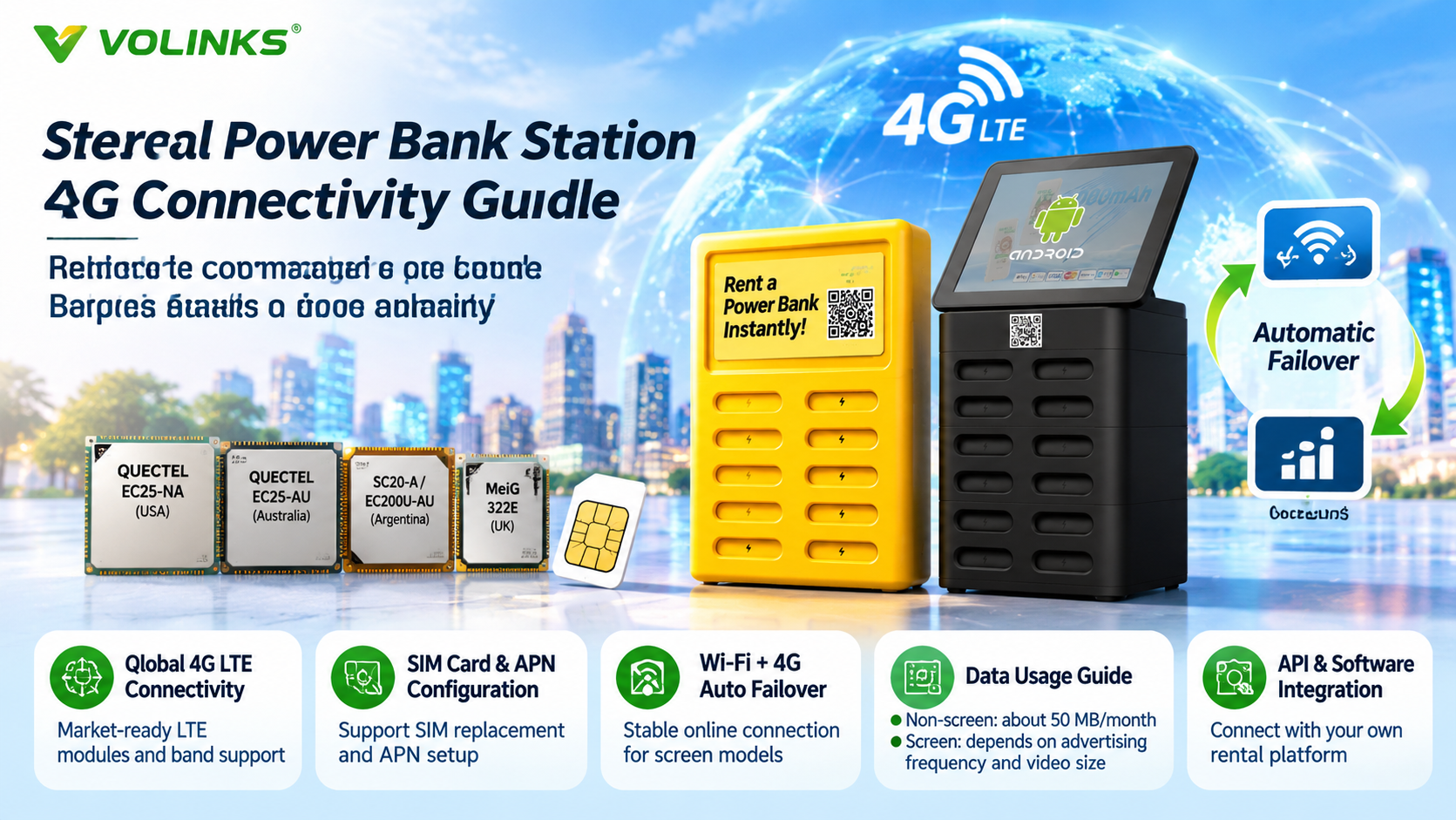
5. SIM Cards, Data Consumption and Long-Term Network Management
What Type of SIM Card Is Required?
VOLINKS shared power bank stations using 4G connectivity require an activated SIM card with a compatible mobile data service.
For commercial deployments, IoT or M2M data SIM cards are often suitable because they are designed for connected devices.
Each station using mobile connectivity normally requires its own SIM card and active data plan.
Before selecting a SIM provider, operators should consider:
Network signal strength at installation locations.
Geographic coverage.
LTE band compatibility.
Monthly data allowance.
SIM renewal and account management.
Long-term service stability.
How Much Mobile Data Does a Shared Power Bank Station Use?
Data consumption varies depending on the station type and operating functions.
Non-Screen Stations
For compact shared power bank stations without advertising screens, typical mobile data consumption is approximately 50 MB per month per station.
This estimate applies to ordinary equipment communication, including rental commands, return notifications and status reporting.
Actual consumption can vary depending on reporting frequency, software configuration and usage patterns.
Screen-Equipped Stations
For stations with advertising screens, data consumption depends mainly on advertising content.
Important factors include:
Advertising video file sizes.
How frequently advertisements are updated.
The number of media files downloaded.
Remote software updates and other network activities.
A station downloading large video files frequently may consume significantly more data than a compact non-screen station.
For this reason, VOLINKS generally recommends using Wi-Fi for advertising content downloads while maintaining a 4G SIM card as an alternative network connection.
Can Operators Replace the SIM Card?
Yes. VOLINKS shared power bank stations support SIM card replacement.
If an operator needs to change the SIM card or mobile network provider, VOLINKS can assist with the corresponding APN configuration.
However, we recommend selecting a reliable SIM card provider with stable signal coverage before deploying a large number of stations.
Frequent SIM card replacement is generally unnecessary unless there is a specific coverage, pricing or service requirement.
Why We Recommend Consistent SIM Card Management
When a rental business grows from a few stations to hundreds of stations, SIM card management becomes more complicated.
Stations may be installed across different restaurants, shopping malls, hotels and entertainment venues.
If an operator uses many different SIM providers, it may become difficult to track:
Which SIM card is installed in each station.
Different data plan expiration dates.
Monthly renewal requirements.
Network coverage differences.
SIM card account balances and service status.
A forgotten renewal or expired data plan may cause a station to go offline.
For this reason, VOLINKS recommends using a consistent SIM provider and centralized SIM management whenever practical.
This approach helps operators reduce avoidable disconnections and simplify long-term maintenance.
6. APN Configuration: How Does It Work?
APN stands for Access Point Name.
It is part of the configuration that allows a cellular device to connect to the mobile operator's data network.
Different SIM card providers may require different APN settings.
Depending on the provider, the configuration may include:
APN name.
Username.
Password.
Additional operator-specific settings.
Example: Argentina Claro SIM Card
For one Argentine project using a Claro SIM card, the customer-provided configuration was:
| Parameter | Configuration |
|---|---|
| APN | igprs.claro.com.ar |
| Username | clarogprs |
| Password | clarogprs999 |
These settings are an example from a specific project, not universal settings for all Claro SIM cards.
Customers should confirm the correct APN information with their SIM card provider.
Does VOLINKS Help Configure the APN?
Yes.
VOLINKS can assist customers with APN configuration during equipment preparation and when changing to another compatible SIM card provider.
When the customer provides the correct operator settings before shipment, the relevant configuration can be prepared in advance.
This helps simplify installation and reduce network setup problems during deployment.
7. How to Set Up 4G Connectivity Before Deployment
Before installing shared power bank stations at customer locations, we recommend completing the following checks.
Step 1: Confirm the Destination Market
Identify the country and the intended mobile network operator.
Step 2: Verify LTE Band Compatibility
Check whether the selected communication module supports the LTE bands required by the local operator.
Step 3: Prepare an Activated SIM Card
Make sure the SIM card has an active data plan and is compatible with the device.
Step 4: Confirm APN Settings
Obtain the correct APN configuration from the SIM card provider.
Step 5: Install and Configure the SIM Card
Insert the SIM card according to the equipment instructions and apply the required network settings.
Step 6: Test the Network Connection
Confirm that the station successfully connects to the management platform and can exchange equipment status information.
Step 7: Test Rental and Return Functions
Verify that remote release commands, rental notifications and return reporting operate correctly.
Step 8: Test Wi-Fi and 4G Failover Where Supported
For screen-equipped stations with automatic failover, verify that the station can recover connectivity through 4G when Wi-Fi becomes unavailable.
Completing these tests before large-scale deployment can help prevent avoidable problems after installation.
8. Troubleshooting Common Shared Power Bank Network Issues
Problem 1: The Station Cannot Connect to the Internet
Possible causes include:
SIM card not activated.
Incorrect APN settings.
Insufficient mobile signal.
Incompatible LTE bands.
Expired data plan.
SIM card installation problems.
Recommended action:
Check the SIM card status, operator coverage, APN settings and communication module compatibility.
Problem 2: The Station Was Working but Suddenly Went Offline
Possible causes include:
SIM data plan expiration.
Temporary mobile network interruption.
Weak signal at the installation location.
Network equipment or configuration changes.
Recommended action:
Check the SIM account, network signal and device connectivity status.
For screen-equipped models, also verify the configured Wi-Fi and 4G failover functions.
Problem 3: The Station Connects but Rental Commands Do Not Work
A network connection alone does not guarantee successful communication with the rental platform.
Possible causes include:
Incorrect server configuration.
Authentication problems.
Backend communication errors.
Incorrect API or device protocol integration.
Recommended action:
Check the station's connection to the backend platform, authentication status and command communication logs.
VOLINKS can provide technical assistance for supported hardware communication and integration issues.
Problem 4: Advertising Videos Use Too Much Mobile Data
This problem mainly affects screen-equipped stations.
Recommended action:
Use Wi-Fi for large advertising downloads, optimize video file sizes and reduce unnecessary media updates.
Keep the 4G SIM card active as an alternative network connection.
9. Connectivity and Independent Rental Software Integration
Reliable connectivity is also important for businesses developing their own shared power bank rental software.
VOLINKS supports customers who want to build and operate an independent rental platform.
Through hardware communication protocols and API integration, customers can develop functions such as:
QR-code-based rental.
Remote power bank release.
Rental and return notifications.
Station and power bank status monitoring.
Equipment inventory management.
Integration with their own payment infrastructure.
Rental order management and reporting.
Customers can develop their own software platform or choose a VOLINKS white-label software solution.
For independent operators, the ability to connect station hardware with their own backend system provides greater flexibility when building a branded rental network.
Hardware connectivity, API integration and payment processing are separate technical components. Each must be configured and tested correctly for the complete rental system to operate.
10. How VOLINKS Supports Global Shared Power Bank Projects
As a shared power bank rental station manufacturer, VOLINKS provides more than equipment supply.
Our team supports overseas customers with hardware configuration and technical preparation for local deployment.
Support can include:
Communication Module Selection
Assistance with choosing a suitable module based on the destination market and available network information.
SIM Card and APN Configuration
Guidance on SIM compatibility and assistance with APN setup or changes.
Network Connectivity Testing
Support for verifying station connectivity and communication with the rental management platform.
Hardware API Integration
Technical documentation and engineering assistance for customers developing their own rental software.
OEM/ODM Customization
Custom station branding, power bank appearance and hardware configurations according to project requirements.
Independent Rental Software Solutions
White-label rental software options for customers who want to operate their own branded shared power bank network.
Whether you are starting with a small pilot project or preparing a larger international rollout, selecting the right network configuration from the beginning can help reduce future operating costs.
Frequently Asked Questions
1. Does every shared power bank station need a SIM card?
Non-screen VOLINKS stations use 4G SIM card connectivity.
Screen-equipped stations can support Wi-Fi and 4G. VOLINKS recommends keeping an active SIM card installed even when Wi-Fi is used as the primary connection.
2. How much data does a shared power bank station consume per month?
A compact non-screen station typically consumes approximately 50 MB per month under ordinary operating conditions.
For screen-equipped stations, data usage depends largely on advertising file sizes, media download frequency and other network activities.
3. Can I use my own local SIM card?
Yes, provided the SIM card and mobile network are compatible with the station's communication module and configuration.
We recommend confirming compatibility before shipment.
4. Can I replace the SIM card after installation?
Yes.
VOLINKS can assist with updating the APN configuration when customers switch to another compatible SIM card provider.
However, frequent SIM replacement is not recommended without a clear operational reason.
5. Can screen-equipped stations automatically switch from Wi-Fi to 4G?
Yes. Supported VOLINKS screen-equipped stations provide automatic Wi-Fi and 4G failover.
When Wi-Fi becomes unavailable, the station can switch to its configured mobile network connection.
An active SIM card and correct network configuration are required.
6. Which 4G module is suitable for the United States?
The EC25-NA is a module option for US projects.
The exact configuration should be verified against the selected mobile network operator's frequency bands and device requirements.
7. Which module is used for Australian projects?
VOLINKS can configure the EC25-AU for Australian projects, subject to compatibility verification with the intended operator and station model.
8. Can one communication module be used across all countries?
Not necessarily.
Different countries and operators use different LTE bands and network requirements.
The appropriate module should be selected according to the destination market.
9. Does VOLINKS provide APN and API integration support?
Yes.
VOLINKS can assist with APN configuration and provide hardware communication documentation and technical support for customers integrating their own rental software.
Conclusion: Reliable Connectivity Starts with the Right Hardware Configuration
Choosing a shared power bank rental station involves more than selecting the number of charging slots or the equipment appearance.
For international rental businesses, reliable connectivity is essential for daily operations.
The right LTE communication module, compatible SIM card, correct APN settings and effective network management can help reduce service interruptions and simplify long-term maintenance.
For screen-equipped stations, combining Wi-Fi with 4G automatic failover provides additional connectivity resilience.
VOLINKS works with overseas customers to prepare shared power bank stations for different markets, including communication module selection, network configuration, OEM/ODM customization and software integration support.
Planning to launch your own shared power bank rental business?
Explore our Shared Power Bank Hardware Solutions or learn more about Starting a Shared Power Bank Business.
Visit VOLINKS to contact our team and discuss the hardware, connectivity and software requirements for your project.


