QR Code vs. POS Payment for Power Bank Rental Stations: Which Is Better for Your Business?
Choosing the right payment method is one of the most important decisions when starting a shared power bank rental business.
In international markets, consumers have different payment habits. Some prefer scanning QR codes and paying through mobile wallets, while others prefer using physical bank cards or contactless payment terminals.
For power bank rental operators, the choice between QR code payment and POS card payment affects much more than the customer payment experience. It also influences hardware costs, software integration, maintenance requirements, deployment flexibility, and the overall investment payback period.
Both solutions have their advantages. However, installing a POS terminal on every power bank rental station is not always necessary or cost-effective.
For most new projects, we recommend starting with an H5 web-based rental system and QR code payment. Once the business has gained market traction and rental demand becomes more predictable, operators can gradually introduce POS terminals at selected locations where physical card payment is necessary.
In this guide, we compare QR code and POS payment solutions for shared power bank rental stations, explain their advantages and limitations, and discuss how to choose the right payment strategy for your market.
1. How Does QR Code Payment Work for Power Bank Rental Stations?
QR code payment is a common rental method in the shared power bank industry.
Users simply scan the QR code displayed on a rental station using their smartphones. A mobile rental page opens in the browser, allowing them to complete the rental process without downloading a dedicated mobile application.
A typical rental process works as follows:
The user scans the QR code on the power bank rental station.
The H5 rental page opens directly in the mobile browser.
The system identifies the station and checks power bank availability.
The user selects an available payment method.
The payment process is completed through the integrated payment gateway.
The backend system sends a release command to the station.
The power bank is released and ready for use.
The entire process can be completed through a mobile browser without installing a dedicated rental app.
Multiple Payment Methods Through One QR Code Rental System
One of the biggest advantages of QR code rental is payment flexibility.
Because payment processing takes place through the H5 rental page and integrated payment gateways, operators can select payment providers according to their local market requirements.
Depending on the payment provider and integration configuration, supported options may include:
Apple Pay
Google Pay
Local mobile wallets
Regional QR payment services
Online bank card payments
Other local payment gateways
For example, customers can use supported mobile wallets to complete a rental without carrying a physical bank card.
This payment experience is particularly convenient for younger consumers and people who are accustomed to mobile payments.
The exact payment methods available depend on the country, payment provider, merchant account, API availability, and technical compatibility.
2. Advantages of QR Code Payment
1. Lower Hardware Costs
QR code rental does not normally require an additional physical POS payment terminal.
The rental station only needs to provide a QR code entry point, while payment processing takes place through the user's smartphone and the integrated payment gateway.
This means:
No additional POS terminal purchase is required.
The station has a simpler hardware structure.
Less additional wiring and installation work is needed.
The overall equipment cost can be lower.
Large-scale deployment becomes more cost-effective.
For operators planning to deploy dozens or hundreds of stations, reducing the additional hardware cost per unit can significantly lower the initial investment.
2. Flexible Payment Integration
QR code rental systems can connect to multiple online payment gateways through an H5 web-based platform.
Operators can choose suitable payment providers according to local customer preferences and business requirements.
Depending on the software and payment gateway capabilities, operators may also configure payment rules, deposits, refund procedures, and other rental-related settings through the backend system.
This flexibility makes QR code rental suitable for businesses operating in different countries and regions.
3. No Physical Bank Card Required
With QR code rental, users only need a smartphone to scan the code and complete the payment.
When supported mobile wallets are integrated, customers do not need to carry a physical bank card.
For younger and mobile-first consumers, this is often a more convenient way to rent a power bank.
The rental process is simple: scan, pay, and take the power bank.
4. Nearby Station Search and Convenient Returns
This is one of the most important differences between mobile QR code rental and standalone POS rental.
With a mobile-based rental platform, users can do more than simply rent a power bank. Depending on the software configuration and location services, they can also view nearby rental stations and available return locations.
For example, users may be able to:
Find nearby power bank rental stations.
Check station locations on a map.
Search for convenient return locations.
Choose another station to return a rented power bank.
This feature is particularly important for shared power bank businesses that support cross-station returns.
A customer can rent a power bank at one location and return it at another participating location, making the service more convenient.
By contrast, a standalone POS rental process does not provide the same mobile-based nearby station search experience. Users cannot simply use the POS terminal to browse a map of nearby return locations.
For operators building a connected rental network, the mobile rental platform provides additional value beyond payment processing.
5. Simpler Hardware and Software Integration
QR code rental mainly relies on an H5 rental page and payment gateway API integration.
It generally does not require additional POS terminal SDK integration or the installation and maintenance of a separate payment device on every station.
For operators who already have their own software development team or plan to build an independent rental platform, QR code integration can offer greater flexibility.
3. Limitations of QR Code Payment
Although QR code payment offers several advantages, operators should also consider its limitations.
1. A Smartphone Is Required
QR code rental depends on the user's smartphone.
Customers without a phone cannot complete the rental process through QR code scanning.
This may be a limitation in markets or locations where some customers prefer to rent using physical bank cards.
2. Depends on the User's Mobile Internet Connection
After scanning the QR code, users need an internet connection to access the H5 rental page.
If the customer's phone has no mobile network coverage or cannot connect to the internet, the rental page may not open.
It is important to distinguish the user's mobile connection from the station's own network connection.
Even if the rental station is connected to the internet through 4G or Wi-Fi, a customer whose phone has no internet access may still be unable to complete a QR code rental.
3. Not Every Customer Is Comfortable with Mobile Payments
Some customers, especially those who are less familiar with smartphones, may find QR code rental less convenient than physical card payment.
If a target market has a significant number of customers who prefer traditional bank cards, adding POS payment may be worth considering.
4. Data Privacy and Regulatory Requirements
H5 rental pages must be designed with applicable data protection and privacy requirements in mind.
For businesses serving customers in Europe, this may include GDPR compliance, appropriate data processing agreements (DPA), privacy notices, user consent mechanisms, and relevant data protection practices.
The specific requirements depend on the business model, data collected, and applicable regulations.
4. How Does POS Card Payment Work?
POS payment allows customers to rent a power bank using a physical payment terminal installed on the rental station.
Unlike QR code rental, customers do not necessarily need a smartphone. They can pay directly using a supported bank card or contactless payment method.
A typical POS rental process works as follows:
The customer approaches the power bank rental station.
The customer selects the rental operation.
The customer taps, inserts, or presents a supported payment card to the POS terminal.
The POS erminal communicates with the payment processor or acquiring service.
The payment result is returned to the rental system.
The system confirms the transaction and sends a release command.
The station releases the power bank.
Depending on the POS model, payment provider, and local acquiring support, payment options may include:
Physical bank card payments.
Contactless card payments.
NFC mobile wallet payments, such as supported Apple Pay or Google Pay transactions.
Local card schemes, such as girocard in Germany, where supported by the terminal and acquiring provider.
One major advantage of POS payment is that customers do not need to carry or use a smartphone.
This can be useful for customers who do not have mobile internet access or prefer paying with a physical bank card.
5. Advantages of POS Card Payment
1. Supports Physical Bank Card Payments
Customers can complete a rental directly through the payment terminal without scanning a QR code or opening a mobile browser.
This is particularly useful in locations such as:
Airports and railway stations.
Shopping malls.
Tourist attractions.
Public transportation hubs.
Locations where physical bank card payments are widely preferred.
2. No Smartphone Required
Unlike QR code rental, POS payment does not require customers to own or use a smartphone.
As long as they have a supported bank card and the payment terminal is functioning with a valid network connection, they can complete the payment.
This allows operators to serve customers who may not be comfortable with mobile-based rental services.
3. Supports Pre-Authorization and Deposit Management
Depending on the POS terminal, acquiring provider, and software integration, a POS-based payment solution may support:
Payment pre-authorization.
Deposit authorization or holds.
Actual payment capture.
Refund processing.
Additional charges for unreturned power banks.
These functions can be useful for operators using deposit-based or pre-authorization rental models.
However, these capabilities are not automatically supported by every POS terminal. They must be confirmed with the payment provider and verified during technical integration.
4. Suitable for Specific Public Locations
In markets where physical bank card payments are common, POS payment can be an important additional option.
It is especially valuable when a project specifically requires customers to rent a power bank using a bank card without relying on a smartphone or QR code.
6. Limitations of POS Payment
POS terminals expand payment options, but they also introduce additional hardware costs and technical requirements.
1. Significantly Higher Hardware Costs
POS terminals need to be purchased separately and installed on the power bank rental stations.
Compared with a standard QR code configuration, POS-enabled stations require additional payment hardware, installation structures, connections, and configuration.
If every station is equipped with a POS terminal, the total project investment can increase considerably.
For operators who are still testing a new market, this creates additional financial pressure.
2. The POS Terminal Must Match the Local Payment Provider
Not every POS terminal is suitable for every shared power bank rental project.
Before purchasing a terminal, operators must confirm:
Whether it supports the payment methods required in the target country.
Whether it is compatible with the local acquiring provider.
Whether it supports the required payment authorization and transaction processes.
Whether the manufacturer provides the necessary SDK or API.
Whether it can communicate with the station's mainboard and software system.
Whether its network connectivity meets the project's requirements.
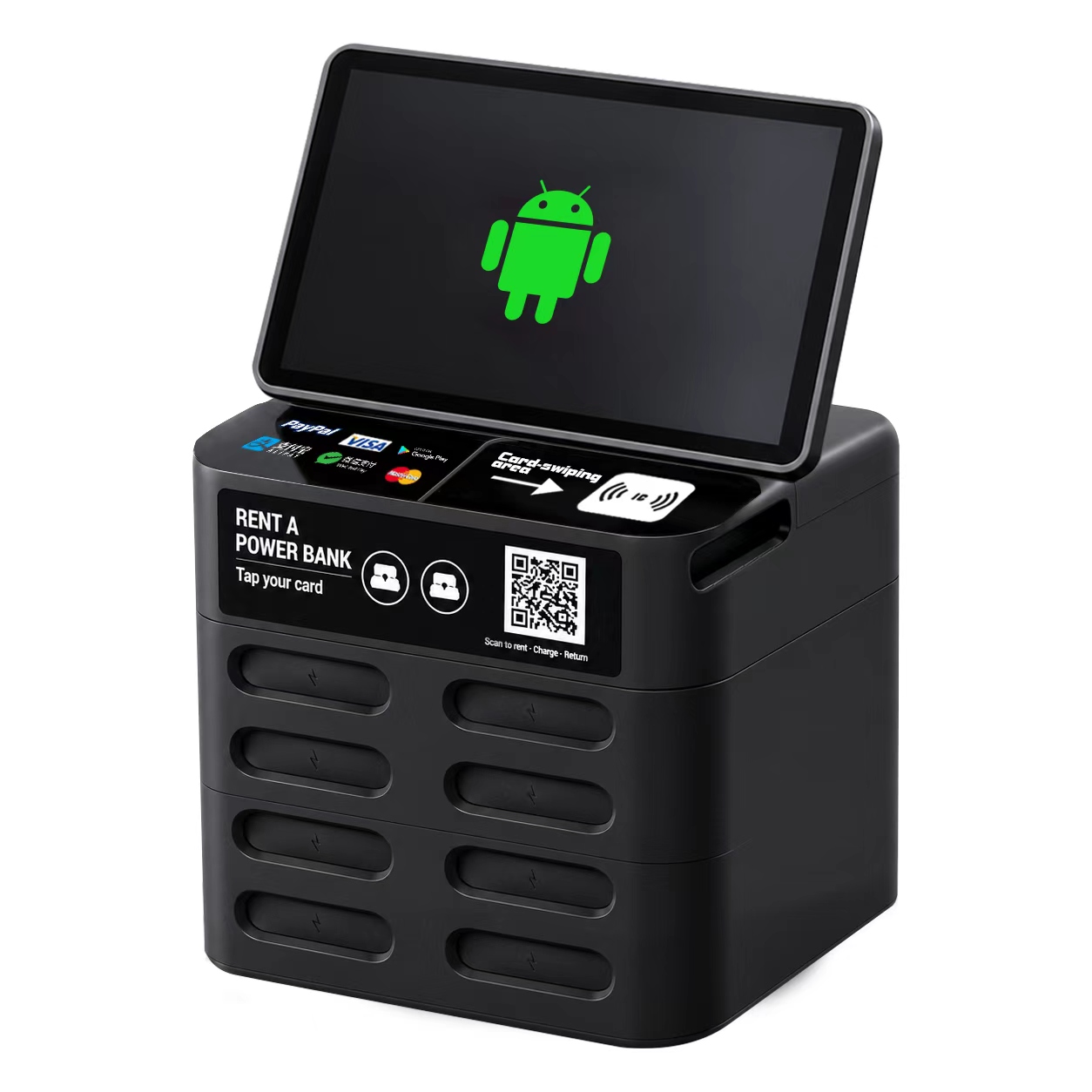
Solutions from providers such as BBPOS and Nayax may be considered during project evaluation. However, compatibility must be verified according to the specific terminal model, payment provider, and software architecture.
Purchasing a POS terminal does not automatically mean it can be installed and used with every power bank rental station.
3. More Complex Software Development and Integration
POS payment usually requires additional integration with the terminal manufacturer's SDK, the payment processor, and the acquiring service.
The development process may involve:
POS terminal communication.
Payment authorization and transaction status synchronization.
Payment notifications and callbacks.
Refunds and transaction reconciliation.
Pre-authorization and deposit management.
Power bank release control.
Failed transaction and exception handling.
Therefore, POS integration normally requires additional technical evaluation and development compared with a standard QR code rental solution.
4. Additional Maintenance and Compliance Requirements
A POS terminal is an additional electronic component that increases the maintenance requirements of a rental station.
Operators may need to consider:
Terminal failures and replacement.
Firmware and software updates.
Network connectivity issues.
Technical support from the terminal provider.
Applicable terminal certification and payment security requirements, including relevant CE and PCI DSS requirements for the specific solution.
The exact certification and compliance obligations depend on the terminal, payment service provider, acquiring arrangement, and target market.
5. Additional Operating Expenses
Some POS terminal suppliers or acquiring providers may charge additional fees, such as:
POS terminal purchase costs.
Terminal service fees.
Monthly or annual management fees.
Payment transaction fees.
Technical service fees.
These costs should be included in the project's initial investment and payback calculations.
6. No Built-In Mobile Nearby Station Search in a Standalone POS Rental Flow
Another limitation of standalone POS rental is that it does not provide the same mobile nearby-station search experience.
When customers rent directly through a physical POS terminal without using the mobile rental platform, they cannot use that terminal to browse nearby rental stations or return locations on a map.
By contrast, customers using mobile QR code rental can access nearby station information through the rental platform, depending on the software configuration.
For operators supporting cross-station returns, this mobile feature can improve convenience and make the rental network more useful.
7. QR Code vs. POS Payment: Key Differences
| Comparison | QR Code Payment | POS Card Payment |
|---|---|---|
| User operation | Scan a QR code | Tap, insert, or present a card |
| Smartphone required | Yes | Not necessarily |
| Physical bank card required | No, if a supported mobile payment method is used | Required for physical card transactions |
| Additional POS hardware | Not required | Required |
| Hardware cost | Lower | Higher |
| Payment options | Multiple online payment gateways | Depends on the terminal and acquiring provider |
| Technical integration | H5 and payment gateway API | Additional POS SDK/API integration |
| User internet dependency | Depends on the user's mobile internet connection | No dependence on the user's phone, but the terminal still needs connectivity |
| Nearby station search | Available through the mobile rental platform, if supported | Not available through a standalone POS terminal |
| Deposit and pre-authorization | Depends on the payment gateway | Depends on the terminal and acquiring provider |
| Maintenance | Relatively simple | Additional terminal maintenance |
| Best suited for | Markets with strong mobile payment adoption | Locations requiring physical card payment |
8. Our Recommendation: Start with QR Code Rental and Add POS Terminals Gradually
For most new shared power bank rental projects, we recommend a phased deployment strategy instead of installing POS terminals on every station from the beginning.
Phase 1: Start with H5 Web-Based Rental and QR Code Payment
At the beginning of the business, we recommend using an H5 web-based rental solution.
Customers scan the QR code and complete the rental process directly through their mobile browsers without downloading a dedicated app.
This approach offers several advantages:
Lower initial equipment investment.
No additional POS terminal purchase.
Support for multiple local payment methods.
Faster market testing and deployment.
Mobile access to nearby rental and return locations, where supported.
Greater flexibility to adjust software and payment rules according to real operating conditions.
For a new project where local demand has not yet been validated, controlling the initial investment is particularly important.
Phase 2: Evaluate Real Market Demand
After the rental stations have been deployed, operators can monitor actual operating data and customer behavior.
Important indicators include:
Average daily rentals per station.
The most frequently used payment methods.
Customer payment preferences at different locations.
Actual demand for physical bank card payment.
How often customers experience mobile connectivity problems.
Equipment utilization and investment payback period.
Real operating data can help determine which locations would benefit from additional POS payment options.
Phase 3: Add POS Terminals at Selected Locations
Once the business is operating successfully and the rental network is expanding, operators can gradually introduce POS terminals at locations where physical card payment is genuinely needed.
For example:
Airports and railway stations.
Shopping districts with high bank card usage.
Locations with large numbers of international travelers.
Public venues where customers specifically request card-based rental.
Not every location needs a POS terminal.
If customers at a particular location mainly use mobile QR code payments, a standard QR code rental station may be the more cost-effective option.
Selective POS deployment helps operators expand payment coverage without increasing hardware investment unnecessarily.
The key principle is simple: Match the payment configuration to actual market demand instead of adding the same hardware to every rental station.
9. How VOLINKS Supports QR Code and POS Payment Solutions
VOLINKS is a shared power bank rental station manufacturer providing hardware, software, API integration, and OEM/ODM customization for operators and business partners worldwide.
We understand that payment preferences and technical requirements vary across countries and projects. Our solutions can be evaluated according to each customer's operating model and local payment requirements.
QR Code and H5 Web-Based Rental
Users scan the QR code on the station and access the H5 rental page directly through their mobile browsers.
No dedicated mobile app is required for this rental flow.
Depending on the software configuration, users can complete rentals, make payments, and view nearby rental and return locations.
Multiple Local Payment Integrations
We support payment gateway API integration according to the requirements of different markets.
The actual supported payment methods depend on local payment providers, API documentation, merchant account requirements, and technical compatibility.
POS Payment Evaluation and Integration
For customers who require physical bank card payments, we can evaluate suitable POS terminals, payment providers, SDK/API interfaces, and station compatibility according to project requirements.
Before mass production, the terminal model and actual payment workflow should be confirmed to ensure that the hardware, software, and payment system work together correctly.
Independent Software Platform and API Integration
For operators who want to manage their own rental business, we support API integration to connect rental stations with their own software platforms and backend systems.
Customers can manage devices, users, transactions, and operational data according to their business requirements.
OEM & ODM Hardware Customization
We provide customized station appearance, branding, and hardware configurations according to individual project requirements.
Explore our solutions:
Whether you need a QR code rental system, local payment gateway integration, POS compatibility evaluation, or customized hardware, VOLINKS can help you plan a suitable solution for your market.
10. Frequently Asked Questions
Q1. Can customers rent a power bank without downloading an app?
Yes. With an H5 web-based rental solution, customers scan the QR code and complete the rental process directly through their mobile browsers without installing a dedicated mobile app.
Q2. Can QR code rental support multiple payment methods?
Yes. An H5 rental page can integrate Stripe, Apple Pay, Google Pay, and other compatible local payment gateways. Actual availability depends on the payment provider, API support, and merchant account requirements.
Q3. Do all shared power bank rental stations need POS terminals?
No. QR code rental does not require an additional physical POS terminal. Operators can decide whether to add POS devices according to local payment habits and project requirements.
Q4. Can I choose any POS terminal for my rental station?
No. The POS terminal must be compatible with the local payment provider, card networks, payment workflow, and rental software interfaces. Different terminal models may have different SDKs, communication methods, and capabilities.
Q5. Can users find nearby return locations when renting through POS?
A standalone POS rental process does not provide the same mobile nearby-station search experience.
Users renting through a mobile QR code rental platform can access nearby rental and return locations if the software supports this feature.
Q6. Can QR code payment and POS payment be used together?
Yes. Operators can deploy both QR code rental and POS payment solutions, offering different payment options according to customer needs at different locations.
Q7. Should a new power bank rental business purchase POS-enabled stations from the beginning?
Not necessarily.
For new projects, we generally recommend starting with H5 web-based rental and QR code payment to test the local market.
Once the business is operating successfully and certain locations have clear demand for physical bank card payment, POS terminals can be introduced gradually.
This phased approach helps control the initial investment and allows equipment configurations to be optimized based on real operating data.
Conclusion: Choose a Payment Strategy That Matches Your Business Stage
QR code payment and POS card payment both have important roles in the shared power bank rental industry, but they serve different customer needs.
QR code payment offers lower additional hardware costs, flexible payment integration, simpler hardware deployment, and mobile access to nearby rental and return locations. It is a practical choice for many new shared power bank rental projects.
POS payment provides an additional option for customers who prefer physical bank cards or do not want to use a smartphone. However, it requires additional hardware investment, terminal compatibility checks, software integration, and ongoing maintenance.
For operators planning to build a long-term shared power bank rental business, we recommend choosing a payment strategy according to local market demand and the project's investment payback period.
Start with QR code rental to validate the market, then selectively add POS payment where your business needs it.
This approach helps reduce initial investment while keeping the hardware configuration of your rental network efficient and flexible.
Planning to launch or expand your shared power bank rental business?
Contact VOLINKS to learn more about our shared power bank rental stations, H5 web-based rental systems, local payment integration, POS compatibility evaluation, and OEM/ODM customization.
Website: https://volinks.com/
VOLINKS – Shared Power Bank Rental Station Manufacturer & Hardware and Software Solutions Provider.


